
Dating and Matchmaking APP.rar Handover: From 7-Zip Package Verification to APK Build and Release Pitfall Avoidance Guide
A full-process guide to taking over the "Taoyuan Dating and Matchmaking APP.rar" handover package: use 7-Zip to verify and extract the package, identify the complete project structure, align Gradle and JDK versions, inspect the APK as a black box, and get a detailed explanation of the four major business parameters: authentication, matching, IM, and compliance. Includes 6 pitfall-avoidance checklist items and a release self-verification checklist to help you quickly evaluate and do secondary development on an outsourced dating project.
Introduction: Aimed at mobile dating and matchmaking development scenarios, this "Taoyuan Dating and Matchmaking APP" project resource covers both the WeChat Mini Program and Android platforms, and is suitable for App developers, Mini Program learners, and students with graduation project or course design needs. The resource package is 61.97MB in size and contains source code projects, demo videos, Mini Program screenshots, and other materials. Although the download page does not separately list the total number of files, the content is enough to support a complete learning process from code reading to comparing runtime effects. Currently 175 people have studied and downloaded it. The project not only demonstrates WXML/WXSS interface construction and JavaScript interaction logic on the WeChat Mini Program side, but also outlines implementation points on the Android side such as Java/Kotlin development, user registration information management, matching algorithms, and message push. It also involves RESTful API design, front-end and back-end data interaction, and storage solutions such as MySQL/MongoDB. Combined with actual demo videos and interface screenshots, readers can quickly understand the core architecture of a cross-platform dating and matchmaking App, and can carry out secondary development on this basis for practical training or portfolio display.
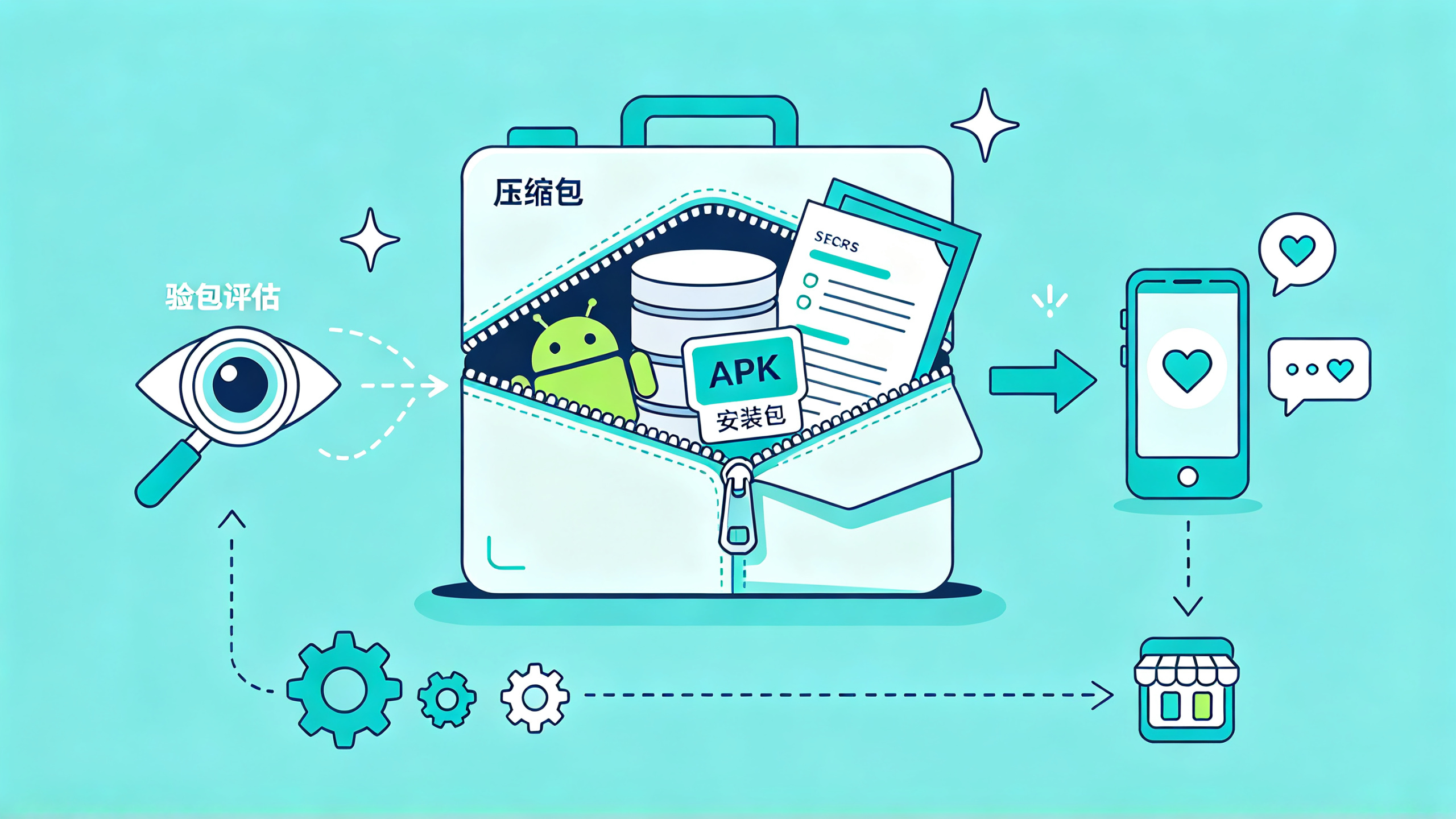
1. What it means to take over "Taoyuan Dating and Matchmaking APP.rar": a deployable dating project delivery package
Friends who do mobile outsourcing acceptance and product evaluation receive this kind of file every few days: a project code name with "APP.rar" appended, and what is inside is often not just an installation package. The "Taoyuan Dating and Matchmaking APP.rar" in the title is a very typical delivery form in the vertical dating and matchmaking track. On the surface it is an installation package, but in reality it is most likely a complete set of secondary-developable engineering: Android source code, a compiled APK, API documentation, database scripts, and even back-end code are all packed into the same rar. The value of this kind of package lies in helping a team save the major costs of building a user system, matching engine, and instant messaging from scratch. It is suitable for handover, evaluation and selection, and for people who want to quickly build an MVP in this direction to validate a business model. Next, treat it as a black box and dismantle it step by step from unpacking to release.
2. Extracting "Taoyuan Dating and Matchmaking APP.rar": use 7-Zip to verify the package, and look clearly at the directory before discussing development
Double-clicking the rar and directly choosing "Extract to current folder" is many people's first reaction, but doing so easily destroys the structural information of the deliverable. When taking over this kind of package, I generally treat it as a formal deliverable: first test integrity, then extract, and finally judge from the directory structure whether the package is a full delivery of "source code + documentation + APK" or just a runnable installation package. If this step is judged wrong, the subsequent secondary development direction will be completely off.
2.1 Can 7-Zip open rar: tool selection and the compatibility boundary of archive formats
Many people ask "can 7zip extract rar files", and the answer is yes. The rar compression format has two generations, RAR4 and RAR5, and 7-Zip can extract both. It can also create most formats other than rar. The only limitation is that it cannot directly "create rar" archives. The rar compression algorithm is proprietary; extraction is unaffected, and only creation receives a copyright prompt. So when you get a .rar delivery package, using 7-Zip to extract it is completely sufficient. There is no need to install ad-laden "rar extraction software" just to extract one package.
Before extracting, I habitually run test mode once to confirm that the archive was not damaged during transmission:
# 测试压缩包完整性,不解压,只校验 CRC
7z t 桃源婚恋交友APP.rar

# 全量解压到 taoyuan_app 目录,重名文件自动改名,避免覆盖
7z x 桃源婚恋交友APP.rar -o./taoyuan_app -y -aou
The first command checks whether every record inside the archive can pass checksum verification. If Data Error appears in the output, it means some file is already damaged, and extracting it will also produce a bad file. The -o in the second line specifies the output directory; note that the path follows the equals sign directly and cannot contain spaces; -y means confirm all prompts; -aou means "automatically rename output files", which is safer than the default overwrite mode, because outsourced delivery packages often contain multiple versions stored under the same file name. If the archive is encrypted, the command line will prompt for a password; when the password is wrong, 7-Zip reports Wrong password, which is a completely different troubleshooting direction from Data Error, so do not mix them up.
If 7z t reports an error and you must obtain the contents inside, you can try repairing a package with recovery records using WinRAR, or check whether it is a multi-volume package. The file names of multi-volume rar archives are usually project.part1.rar, project.part2.rar, and of course you cannot extract it if you only have one of the files. This kind of package is very common in cloud drive transfer scenarios, so first confirm the files are complete before starting.
2.2 After extraction, first look at three things: directory structure, APK version, and permission list
After extraction, do not immediately look for the APK to install on a phone. First look clearly at what the directory looks like. A complete dating and matchmaking APP delivery package usually contains these parts:
Directory/File | Typical Content | Key Points to Check During Inspection |
app-release.apk | Installable official package | Whether the version number matches the source code, whether the signature is official |
android/ or app/ | Android Studio project | Whether settings.gradle and app/build.gradle exist |
doc/ | Requirements documents, API documents | Whether there are interface definitions related to login, matching, IM, and gifts |
database/ | Table creation SQL or database backup | Whether user tables, matching record tables, and chat tables are complete |
server/ | Back-end project | What the tech stack is, and whether the service can be started locally |
After judging the directory, use the command line to quickly confirm the file scale and the real occupied size after extraction:
# 看压缩包本身大小
ls -lh 桃源婚恋交友APP.rar

# 看解压后占用空间
du -sh taoyuan_app

# 看前两层目录结构,快速定位工程入口
find taoyuan_app -maxdepth 2 -type d | head -30
This section is key to judging the completeness of the deliverable. If the archive is only a few MB, it most likely contains only an APK or documents, with no source code; only several hundred MB or more could be a complete project plus dependency caches. The find command limits maxdepth 2 to avoid being drowned by a large number of inner third-party library directories, so first see the top-level structure clearly. Many packages, after extraction, still have an outer directory with the same name. If you directly open this inner directory as the project root directory, it is easy to fail to find the Gradle files. In this case, first cd taoyuan_app/Taoyuan Dating and Matchmaking APP and then search further down.
At this point, you should have a clear judgment in hand: whether this package can be used for secondary development, and to what extent it can be done, the next path is completely different. A runnable APK and modifiable source code are two different delivery depths, and next we will discuss the approaches for these two paths separately.
3. Get the dating and matchmaking APP project running: with source code, go through the build; without source code, go through package verification
The first thing after taking over is never to read the business code, but to get the project running locally. A source code package that fails to build, no matter how beautifully the business is written, is waste paper; an APK that cannot be installed, no matter how complete the features, has nothing to do with you. This chapter is split into two paths: how to compile the Debug package when you have the Android project source code, and how to use black-box verification to judge whether this package is worth further investment when you only have the APK.
3.1 When you have Android source code: align the trio of Gradle, JDK, and SDK first
For a long-lifecycle project like dating and matchmaking, the tech stack is very likely stuck two or three years ago, or even earlier. When you get the source code, first look at the Gradle version locked in gradle-wrapper.properties, then look at the local JDK version, and finally confirm whether the Android SDK Platform has the version corresponding to compileSdk installed. If the three versions do not match, the errors will make you doubt life.
# 查看 Gradle wrapper 锁定的版本
cat gradle/wrapper/gradle-wrapper.properties

# 查看当前 JDK 版本
java -version

# 查看已安装的 Android SDK 平台
ls $ANDROID_HOME/platforms

# 直接构建 Debug 包,带堆栈输出
./gradlew :app:assembleDebug --stacktrace
Among them, the distributionUrl in gradle-wrapper.properties determines the Gradle version, and this line is the first place to check. Gradle 7.x usually works with JDK 11 or JDK 17, while Gradle 8.x basically requires JDK 17. A version mismatch will directly report errors like Unsupported class file major version during the startup phase. The --stacktrace parameter is crucial; Android build errors by default show only one sentence, and only by adding it can you see whether it is a dependency download failure or a resource compilation problem.
There are three most common failure points during the build phase. The first is dependency download timeout, with an error like Could not download com.android.tools.build:gradle:8.0.2. A common practice is to configure a domestically accessible Maven mirror repository in settings.gradle, but note that you should only add the mirror and not delete the original repository entirely. The second is AAPT2 error, which is caused by a mismatch between the build-tools version and compileSdk; just install the corresponding version of build-tools. The third is missing NDK. If the project has C/C++ modules, install NDK and CMake together in SDK Manager.
After the Debug package is built, it uses the debug signature by default, and can only be installed locally for self-testing, not directly published. This point must be clearly recorded during acceptance, otherwise the signing problem will be discovered later during the release phase and everything will have to be redone. A successful build is only the starting point; the real business verification begins after it is installed on the phone.
3.2 When you only have the APK: treat it as black-box verification, and bypassing authorization for secondary distribution is not encouraged
In many selection scenarios you cannot get the source code, and there is only one APK in the rar. At this time what you need to do is acceptance of the nature of "app reverse engineering", with the purpose of confirming the package's behavior, permissions, and interfaces, not cracking it. First, the boundary: a package with only an APK can only be used for evaluation and acceptance. If you do not have the author's authorization, you cannot decompile it and repackage it, change the signature, and redistribute it. Dating and matchmaking involves real user privacy, and copyright and compliance issues are more sensitive than ordinary utility Apps.
The first step in package verification is to use aapt to read the APK's metadata:
# 查看包名、版本号、安装所需权限
aapt dump badging app-release.apk

# 反编译资源文件,用于查看 AndroidManifest.xml
apktool d app-release.apk -o apk_decompiled
The package: line output by aapt dump badging contains the package name and versionCode/versionName, and the uses-permission: lines list all permissions requested by this App. The items a dating and matchmaking App should be most wary of: READ_CONTACTS (read contacts), ACCESS_FINE_LOCATION (precise location), READ_PHONE_STATE (read device state). If the permissions do not match the product features, this package will most likely be blocked by app stores during publishing. What apktool d extracts is resources and smali bytecode, mainly used to check whether AndroidManifest.xml declares components that should not exist, and whether string resources contain hardcoded API domains.
Next, do acceptance at the interface level. The most direct way is to make the phone go through an HTTP proxy for packet capture. This step often encounters the problem of "app packet capture failure": Android 7.0 and above do not trust user-installed CA certificates by default, and even after installing the certificate in Charles, it is still all SSL handshake failed. In this situation, first confirm whether the proxy port is reachable and whether the certificate is installed in the system trust area (this requires the test device to have write permission to the system partition), and then determine whether the App has certificate verification. Debug packages can have SSL Pinning disabled; do not perform such bypass operations on release packages, as that is not acceptance but an attack.
The interface information visible through packet capture is very valuable: whether the requested domain is HTTPS or plaintext HTTP, whether the token is placed in the Header or Body, whether the login interface transmits a plaintext password, and whether it quietly uploads contacts in the background. Record these, as they directly determine whether this package can serve as the business foundation, and also determine whether you should continue asking the delivery party for the source code. The core of black-box verification is one sentence: whether it is worth investing depends on how real the runtime behavior you can see is.
4. The four business parameters that must be tuned for a dating and matchmaking APP: authentication, matching, IM, and compliance
After the project runs through, what truly determines whether the product can survive is not the interface, but several business parameters. The biggest difference between the dating and matchmaking track and general social networking is that users come with clear purposes, and the platform must be responsible for authenticity and safety. This chapter discusses the four places I will definitely tune after getting this kind of project, each of which directly affects conversion rate, retention, and publishing review.
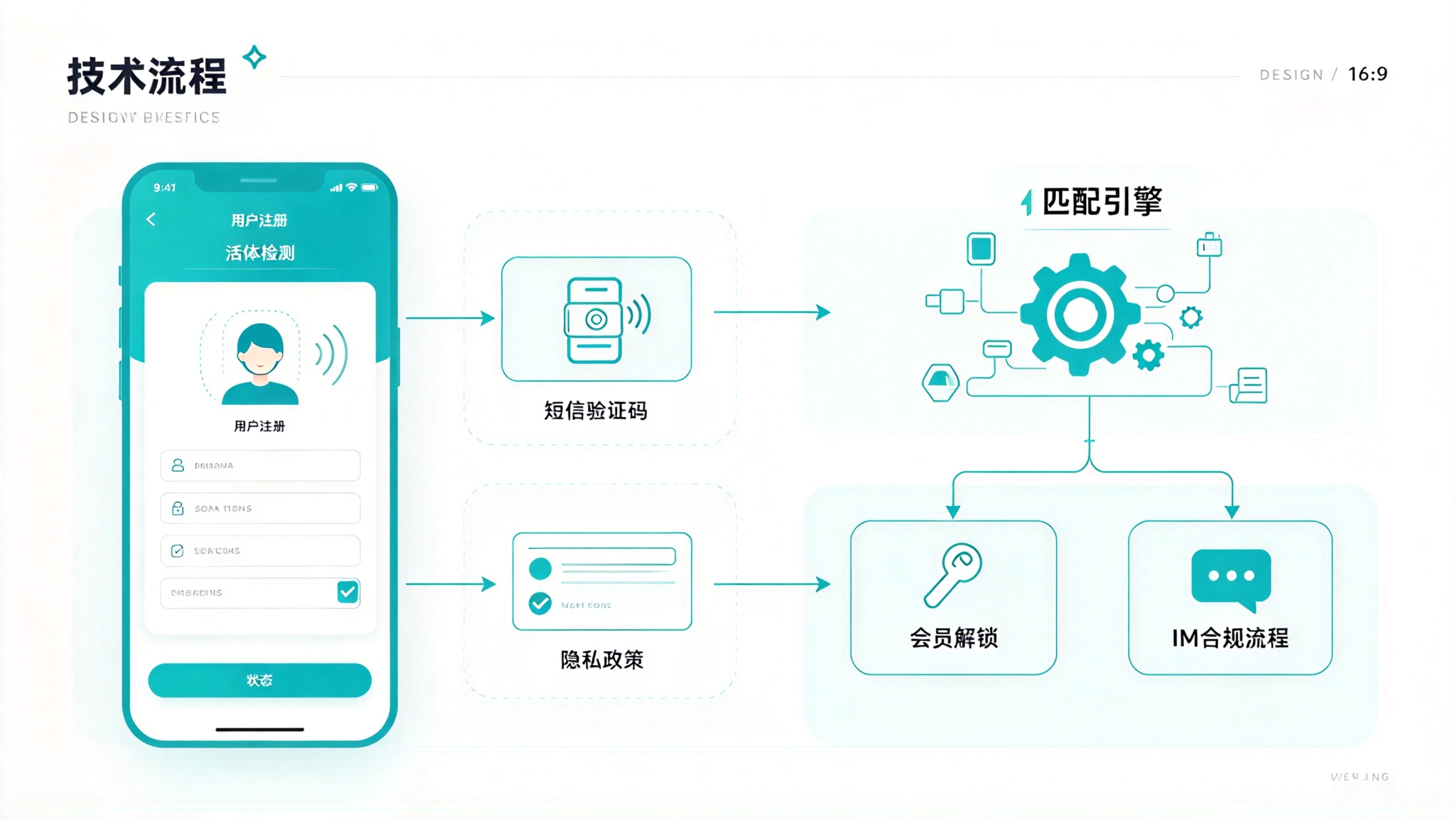
4.1 Registration and real-name authentication: verification code validity period and liveness threshold directly determine conversion rate
The registration flow of dating products is heavier than ordinary Apps, because all subsequent matching depends on the authenticity of user profiles. For SMS verification codes, common parameter configurations are as follows:
Parameter | Recommended value | Consequence of improper setting |
Verification code validity period | 5 minutes | Too short causes users to expire before finishing input, too long increases the risk of theft |
Resend interval for the same number | 60 seconds | Too short and the SMS API gets hammered, too long and users are lost during campaign acquisition |
Daily cap per number | 10 times | After exceeding, it locks until the next day to prevent verification code bombing |
Face liveness threshold | 0.7 ~ 0.8 | Set it too high and real people get rejected easily, set it too low and photo spoofing can pass |
Privacy policy checkbox | Must be upfront | If not upfront, store listing review will definitely reject it, this is a hard red line |
Face recognition generally integrates a third-party provider's SDK. When integrating, the key thing to check is whether liveness detection does a secondary verification on the server side. Some cheap solutions only do client-side detection, and you can bypass it by capturing packets and modifying the return value. In dating products this is fatal—fake genders and photo fraud will directly shatter trust. During acceptance testing, I habitually use a printed photo as a test. If the photo can pass registration, this authentication solution is unqualified.
4.2 Matching engine: how to weight distance, activity level, and profile completeness
Matching is the core path of a dating app, but the matching logic in most delivery packages is disappointingly simple—one SQL query for age range plus gender and that's it. A truly usable match needs at least a two-layer structure of hard filtering and soft scoring:
{
  "filter": {
    "gender": "female",
    "distance_km": 10,
    "age_range": [22, 35],
    "height_cm": [160, 185],
    "education": "college"
  },
  "score": {
    "recent_active_1h": 0.4,
    "profile_completeness": 0.3,
    "credit_score": 0.2,
    "reg_time_weight": 0.1
  },
  "limit": 20
}
The conditions in filter are hard requirements; if not met, the user is directly excluded, ensuring that everyone a user sees is within an acceptable range; score is soft ranking, determining who among those who equally meet the conditions ranks first. The easiest pitfall to hit here is giving the activity weight too high: a newly registered user, no matter how complete their profile, won't rank, and during the cold start period new users see only old users, so the churn rate will look terrible. A common approach is to give new users a separate cold start logic—for the first 7 days, only look at gender, distance, and most recent active time, with ranking weights pushed to the background, and once the user has browsing behavior, gradually introduce the full scoring mechanism.
credit_score is a parameter unique to dating products. Users get points deducted for being reported, blocked, or having abnormal photo recognition, and once deducted below the threshold they no longer participate in recommendations. This score is not given at registration, but gradually forms after real-name verification and accumulated active behavior. It is essentially a post-hoc guarantee of matching quality.
4.3 IM and message compliance: pre-filtering sensitive words, adding asynchronous review for stranger chats
Instant messaging in dating apps is on a completely different level of requirements from acquaintance social products. You don't need a thousand-people-thousand-faces group chat system, but one-on-one chat, system notifications, and gift animations must be stable. In terms of technology selection, self-developed WebSocket is completely feasible at low concurrency, but delivery packages more often directly integrate a third-party IM SDK, saving the cost of maintaining long connections. When selecting, look at three metrics: one-on-one message latency, offline message push success rate, and the flexibility of the sensitive content review interface.
The compliance pressure of stranger socializing is concentrated on chat content. I generally do pre-interception of sensitive words at the gateway layer; if hit, it is directly not sent and counted into the user's behavior score; image and voice messages are first converted to text and then asynchronously reviewed, and neither party can see them before review passes. If this process is not done, app store review will reject it on the grounds of 'risk of pornographic content,' and the public security filing stage is even more troublesome. Chat records themselves also need a defined storage strategy:
Message type | Handling strategy | Description |
Text message | Gateway pre-filtering of sensitive words | Intercepted on hit, not stored in the database |
Image message | Visible after OCR review | Review queue latency controlled at the second level |
Voice message | Reviewed after conversion to text | Failed transcription goes to manual spot checks |
Report one-on-one chat | Block + mute + evidence retention | Mute duration increases with the number of times |
4.4 Monetization and data tracking: membership unlock, matchmaker intervention, and uninstall recovery
The monetization path of dating products is more direct than that of utility apps: membership unlocking strong-intent features like 'who viewed me' and 'people who like me' is a money-making point included by default in almost every delivery package. The first payment price is commonly set in the 99 to 299 range; too low lowers psychological expectations, too high makes conversion plummet. Another distinctive monetization scenario is matchmaker service—after the user pays, a real person intervenes to recommend and matchmake. This business has very high gross margin, but depends on the operations team to handle it, and is not suitable for purely online automated running.
On the data tracking side, the easiest thing for novice teams to miss is the 'uninstall recovery' path. Dating users come back after churning, because the need persists. At minimum you should track: registration conversion (step-by-step conversion rate from verification code to profile completion), match click-through rate, first session duration, and payment conversion. The three dimensions of channel, city, and age group must be cross-analyzable, otherwise ad optimization is impossible to discuss. These parameters are not configured only before listing; they should be confirmed on the day the engineering runs through, checking whether the interfaces are reserved. I have seen too many packages with exquisite interfaces and not a single tracking interface, and later when doing growth they can only release a new version to supplement data, which is very passive.
5. Pitfall checklist: the 6 places where taking over a dating app most easily goes wrong
Having seen many of these handover packages, the problems are actually highly repetitive. The following 6 items are recorded as 'phenomenon → cause → solution,' all of which I have actually stepped on during package inspection and launch. Checking them in order can save a lot of wasted effort.
5.1 rar extraction errors, wrong password, antivirus false positives
Phenomenon: 7z t reports Data Error, or extraction asks for a password but the password provided by the delivery party cannot be entered correctly no matter what, and antivirus software directly deletes the extracted APK.
Cause: Cloud drive transmission causes the compressed package to be corrupted, file name encoding becomes garbled during cross-platform transfer, some hardened APKs have their signatures misjudged by antivirus software, and there are also cases where the delivery party wrote the two layers of compression passwords in reverse.
Solution: First run 7z t to confirm whether it is really corrupted; when file names are garbled, add -mcp=65001 to the extraction command to force UTF-8 encoding; when an APK is falsely flagged by antivirus software, first compare the MD5, confirm with the delivery party that the hash matches, and then decide whether to allow it. If the password is wrong, do not rush to use a tool to brute-force it. First ask the delivery party for the original package creation record. In most cases, the password had an extra space when copied, or the two layers of passwords were reversed.
5.2 The source code version and the APK do not match, so changes are as good as no changes
Symptom: After modifying the functionality according to the source code, the built package behaves completely differently from the old APK. The list page sorting, API domain name, and even the UI copy do not match.
Cause: The APK in the rar was not compiled from this source code. The delivery party gave you the source code from branch A and the APK from branch B.
Solution: Use aapt dump badging app-release.apk to read the versionName, then compare it with the versionCode and versionName in app/build.gradle. If they do not match, directly ask the delivery party for the corresponding branch. Do not guess on your own. This check should be done on the day of extraction. Discovering it in the middle of development will waste an entire iteration cycle.
5.3 The API address is hard-coded to an intranet IP, and switching environments causes a full collapse
Symptom: The App runs in the delivery party's office, but when you take it back to your own office it cannot connect to the server, and the logs are full of Connection refused.
Cause: During development, the debugging IP was hard-coded into BuildConfig or a constants class, and the configuration was not extracted by environment at delivery time. This kind of hard-coding is sometimes also hidden in the initialization parameters of third-party SDKs, and searching for 192.168. will not find all of it.
Solution: Globally search for http:// and IP addresses, converge all API addresses into BuildConfig.API_BASE_URL, and manage them with the three flavor dimensions dev, sit, and prod. The same applies to third-party credentials such as push keys and map keys. Replace all of them when migrating environments. Missing even one is a production incident.
5.4 When HTTPS packet capture fails, first distinguish whether it is a certificate issue or Pinning
Symptom: After setting up the proxy on the phone, Charles can only see TCP connections, and all requests are SSL handshake failed, which is the typical "app packet capture failure".
Cause: Android 7.0 and above does not trust user-installed CA certificates by default, or the App performs certificate pinning verification on the client side.
Solution: First visit an ordinary web page to confirm that the proxy chain itself is working; then install the Charles certificate into the system trust store on the test device. This step requires the test device to have write permission on the system partition; only then determine whether SSL Pinning has been implemented. For debug builds, the developer can temporarily disable verification. Do not perform bypass operations on release builds. The purpose of packet capture is to confirm whether the App uploads data it should not upload, not to attack it.
5.5 Excessive permission declarations cause app store rejection at release
Symptom: Yingyongbao and Xiaomi Store review feedback says "the permission to read contacts does not match the business function," and the app is directly rejected.
Cause: To make the App "feature-complete," the delivery party applied for all permissions, including unused ones. A typical mistaken application for dating and matchmaking products is READ_CONTACTS — the product has no invite-friends feature at all, yet the permission is still listed in the Manifest.
Solution: Review the permission list output by aapt dump badging one by one, and delete all permissions that have no corresponding feature call. Change location permission to foreground use, and state the purpose of each permission in the privacy policy. If this step is not done, you will be rejected one by one by multiple stores during the release stage, which wastes a lot of time.
5.6 Lack of real gender verification causes an imbalanced male-to-female ratio and a collapse in reputation
Symptom: Paying users report that "half of the matched users are bots," and the complaint rate rises.
Cause: In the early stage, many dating packages do not enforce face-based real-name verification in order to lower the registration barrier. Virtual accounts registered in bulk by the gray industry flood in, and the gender ratio is completely polluted.
Solution: Enforce face liveness detection in the registration flow, and weight the ranking of verified users in the matching API; existing old users should complete real-name supplementation in stages, and their matching count should be limited before supplementation is completed. This pitfall is at the business level. It is not technically difficult; the difficulty lies in operational determination — forcing real-name verification will suppress registration conversion in the short term, but if a dating product does not suppress this, the later cost will be too high to contain.
6. Pre-release self-check list and a finishing habit
After the previous changes are done, the last step is release. Many teams just toss the APK into a group chat and call it done, then wait for users to complain. I am used to going through a checklist before release to avoid sending out a debug build or a problematic build:
Check Item | Specific Verification Method | Pass Criteria |
Core Functions | Run through the full chain of registration, matching, IM, and gifts | No blocking crashes |
Performance | Cold start timing, memory usage, weak network simulation | Cold start within 3 seconds, no white screen on weak network |
Security | Capture packets to inspect sensitive fields, search for hardcoded keys | Passwords are not transmitted in plaintext, no internal network IPs |
Compliance | Permission list, privacy policy, minor protection | One-to-one correspondence with product functions, no excessive permission requests |
Compatibility | Android 8 to 14, mainstream manufacturer models | No system-level crashes |
Accessibility | System font size switching, accessibility services | Layout does not overlap, key buttons are reachable |
The detail of "app font settings" is often overlooked. After users set the system font to the maximum, many dating interfaces will have button text truncated, and the core action buttons of dating products happen to be short words like "Like" and "Say Hi"; once truncated, the entire conversion funnel is broken. Running through the main flow once in system font enlargement mode before release is worth more than testing 20 device models.
Another habit I only developed after suffering a loss: before every release, forcibly modify versionCode and versionName, and tag Git. This action seems simple, but it ensures that when problems occur online, you always know which version of the code the user has installed, and combined with crash logs you can quickly locate the issue. It is also your "regret medicine"—when one day you find that the new version has a serious problem, you can rely on the version number to accurately roll back to the previous usable package instead of guessing.
When I first took over projects like dating and social networking in the early days, I made a rookie mistake: after getting the APK, I installed it directly without checking the signature information, and after testing the functions and feeling there was no problem, I let the business team go negotiate the listing. As a result, when we got to the app store, we discovered the package was signed with someone else's channel signature, and re-signing it was equivalent to going through the review process all over again. After that, all my projects uniformly follow one process: verify the package, align the version, check the signature, and then install. The rework time this habit has saved me is worth more than any technical optimization. Hope it helps you.
This article also has accompanying premium resources; click to obtain