
iOS App Store Submission Pitfall Avoidance: The Full Process from a 5.6 Rejection to Multiple Rejections Triggering Account Bans—Troubleshooting and Remediation
From a 5.6 rejection to the account ban risk after multiple rejections, this outlines an actionable troubleshooting and remediation process for developers, including qualification verification, metadata consistency, IPA similarity detection, and a pre-submission checklist.
Problem Introduction: Why a 5.6 Rejection Easily Slides Toward an Account Ban
When many developers receive a Guideline 5.6 rejection for the first time, their first reaction is to change metadata, swap keywords, and then immediately resubmit for review. This action may work for ordinary feature-related issues, but in 5.6 scenarios it often accelerates deterioration.
Guideline 5.6 corresponds to the reviewer believing that the app has engaged in manipulating review, misleading review, or circumventing review. It is different in nature from "a certain feature was not done well": the reviewer will focus on judging whether your remediation is genuine and whether submissions before and after are consistent. If you merely rephrase things and continue submitting, or avoid addressing obvious problems, the probability of the account entering the ban process will rise significantly.
Below, following the handling order from a 5.6 rejection to multiple rejections, an actionable troubleshooting and remediation process for developers is outlined.
One: First Determine Which Type of Risk the 5.6 Specifically Points To
Do not stare only at the number "5.6." You must combine the original text in the Resolution Center, attached screenshots, and your submission history to determine the entry point of the problem. There are commonly three types:
Metadata does not match the actual content inside the package.Screenshots, descriptions, keywords, or preview videos display features that are not in the package, or display interfaces that are only delivered after the review period.
The submission method is judged as circumventing review.For example, hidden features, dynamically delivered content during review, modules inside the package unrelated to the description, or inconsistent feature exposure between different versions.
An app type was submitted that does not match the entity's qualifications.An individual developer submitting sensitive categories such as simulated gambling or finance is a typical qualification boundary issue.
First write one conclusion: is it a qualification issue, a metadata issue, or a package issue. Different conclusions mean completely different remediation actions. If you cannot write this conclusion, do not rush to reply to the email or submit a new version.
Two: Step-by-Step Remediation Process
Step One: Freeze Submissions and First Record the Timeline
After receiving a 5.6 rejection, do not make small changes on the original package and directly resubmit. First organize a timeline: rejected version number, rejection time, corresponding clause, original text in the Resolution Center, and attachment explanations. Mark the versions where the same problem appears repeatedly; this is often the key basis for later judging account risk.
Step Two: Verify the Entity's Qualifications
If your App falls into a restricted category, first confirm whether the individual account has submission eligibility. For example, for gambling apps, the rejection email explicitly mentions that only approved corporate entities may submit. When qualifications do not match, continuing to modify the package is meaningless; you should first adjust the product positioning, or replan using an entity that meets the requirements. Note that the screenshot can only prove the judgment stated in that email; it does not represent the inevitable result of current policy or other people's cases.
Step Three: Verify Consistency Between Metadata and the Package
Compare item by item the descriptions, screenshots, keywords, and preview videos in each language, and confirm that all displayed interfaces and features can actually be triggered inside the package and do not depend on switches or remote configurations delivered only after the review period. What is seen after logging in with the review account should be consistent with what ordinary users see. Any "review-only entry" may be judged as misleading review.
Step Four: Check Package Similarity
If the team maintains multiple apps at the same time, or has purchased source code for secondary development, 5.6 often appears together with 4.3. Before submitting for review, it is recommended to run an IPA similarity check and observe the comparison results of the business binary, resources, directory structure, and identical files, so as to avoid being judged as a duplicate app.
The detection report will reflect similarity scores and dimensions, for example, analysis of the Mach-O binary structure, metadata and resources, control flow and data flow, SHA-256 identical file matching, etc. These results can serve as a basis for self-inspection, but they cannot replace the review conclusion, nor do they mean that passing the detection will definitely pass the review.
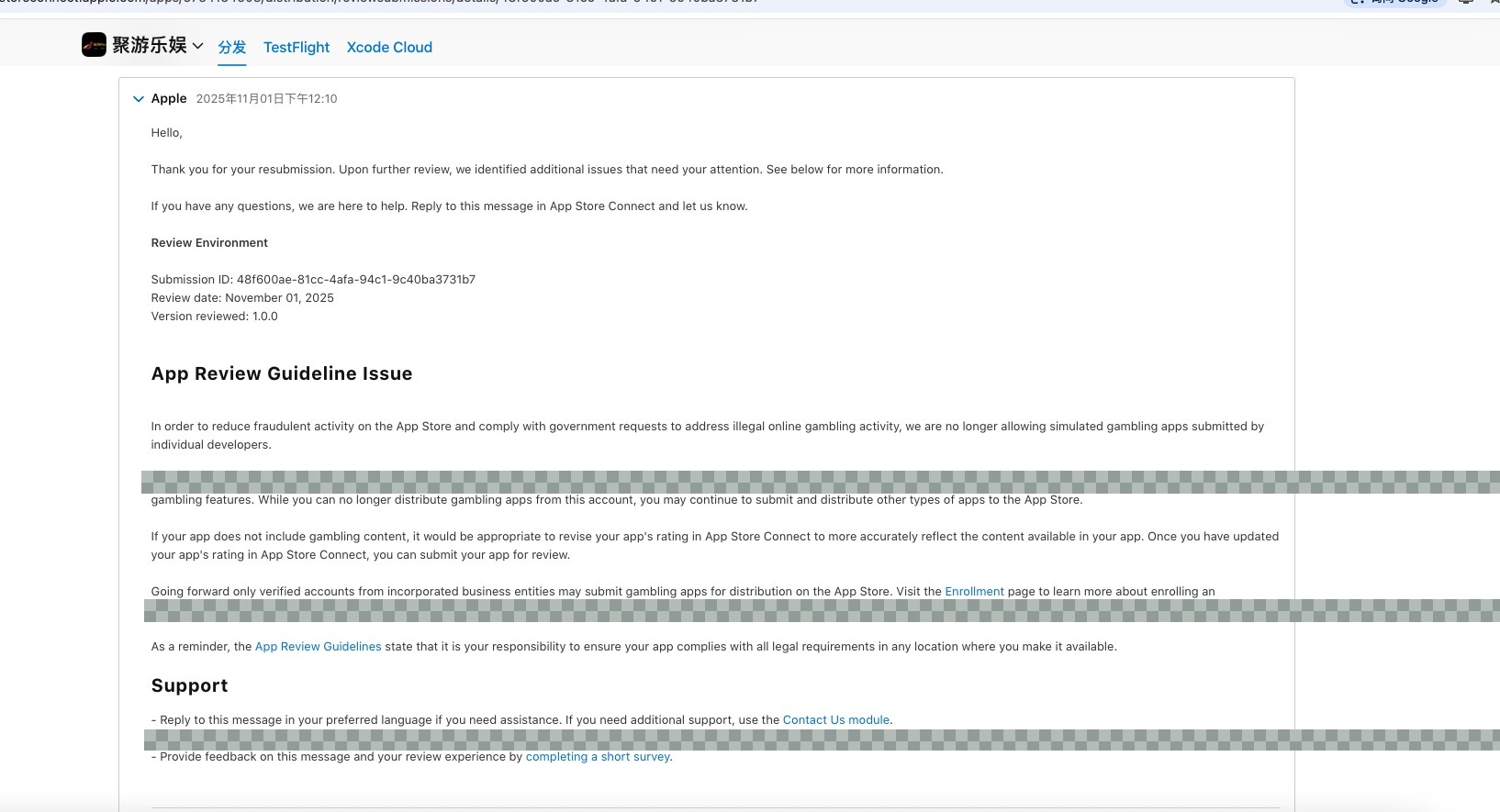
The image above is a fragment of the qualification explanation in the rejection email. You can compare it with your own original rejection text to determine whether it belongs to the same type of issue.
Step Five: Write the rectification explanation
When replying in the Resolution Center, state only verifiable facts: what was changed, in which version it took effect, and how to verify it. Do not promise expressions that cannot be checked, such as "completed" or "guaranteed compliance," and do not include content inconsistent with the facts in the explanation—false information in the reply will directly affect the survival of the account.
Three, Stop-Loss Actions Before Account Ban After Multiple Rejections
If 5.6 has already been rejected multiple times and the account status begins to become abnormal, it is recommended to immediately stop repeated submissions and instead conduct a complete self-inspection:
Organize all rejected versions and rejected clauses, and confirm whether the same issue appears repeatedly;
Confirm whether false information was provided in the reply, as this will directly affect the survival of the account;
Suspend submissions for all associated apps to avoid triggering chain handling at the entity level;
If qualification issues are involved, do not submit similar apps again before rectification is completed.
It should be noted that the ban determination is made by the review party. This article cannot promise any appeal result, nor does it provide methods to evade review. The following checklist is only used to improve the completeness of self-inspection.
Four, Pre-Submission Checklist
Check Item | Pass Condition |
|---|---|
Entity Qualification | Sensitive categories have been confirmed to meet the requirements of the submitting entity |
Metadata Consistency | Descriptions, screenshots, and keywords can all be triggered within the package and do not depend on switches issued after review |
Package Independence | Similarity detection has been done, with no abnormal duplication |
Rectification Explanation | Contains only verifiable facts, no exaggerated promises, no false statements |
Submission Pace | Do not submit a new version for review before the same issue has been fully rectified. |
Five. Conclusion
5.6 The core of being rejected is not "where to change," but "whether it is authentic and whether it matches the qualifications." Check the three things—qualifications, metadata, and the package body—clearly, and then decide the review submission pace; this saves more time than repeated trial and error. This article is based on publicly available rejection situations and is suitable for self-check and rectification preparation; it does not constitute a promise of review results.