
How to Publish an iOS App Developed with HBuilderX: Certificate Configuration, Packaging, and Review Preparation
For developers building hybrid apps with HBuilderX, this article outlines the accounts, certificates, and provisioning profiles required to publish an iOS app, explains the key steps of manifest configuration, native plugin permission checks, packaging and uploading, and preparing materials in App Store Connect, and covers privacy statements, in-app purchases, copyright questionnaires, and post-release version maintenance, helping you check release materials step by step.
1. Panoramic Overview of the Core iOS App Publishing Process
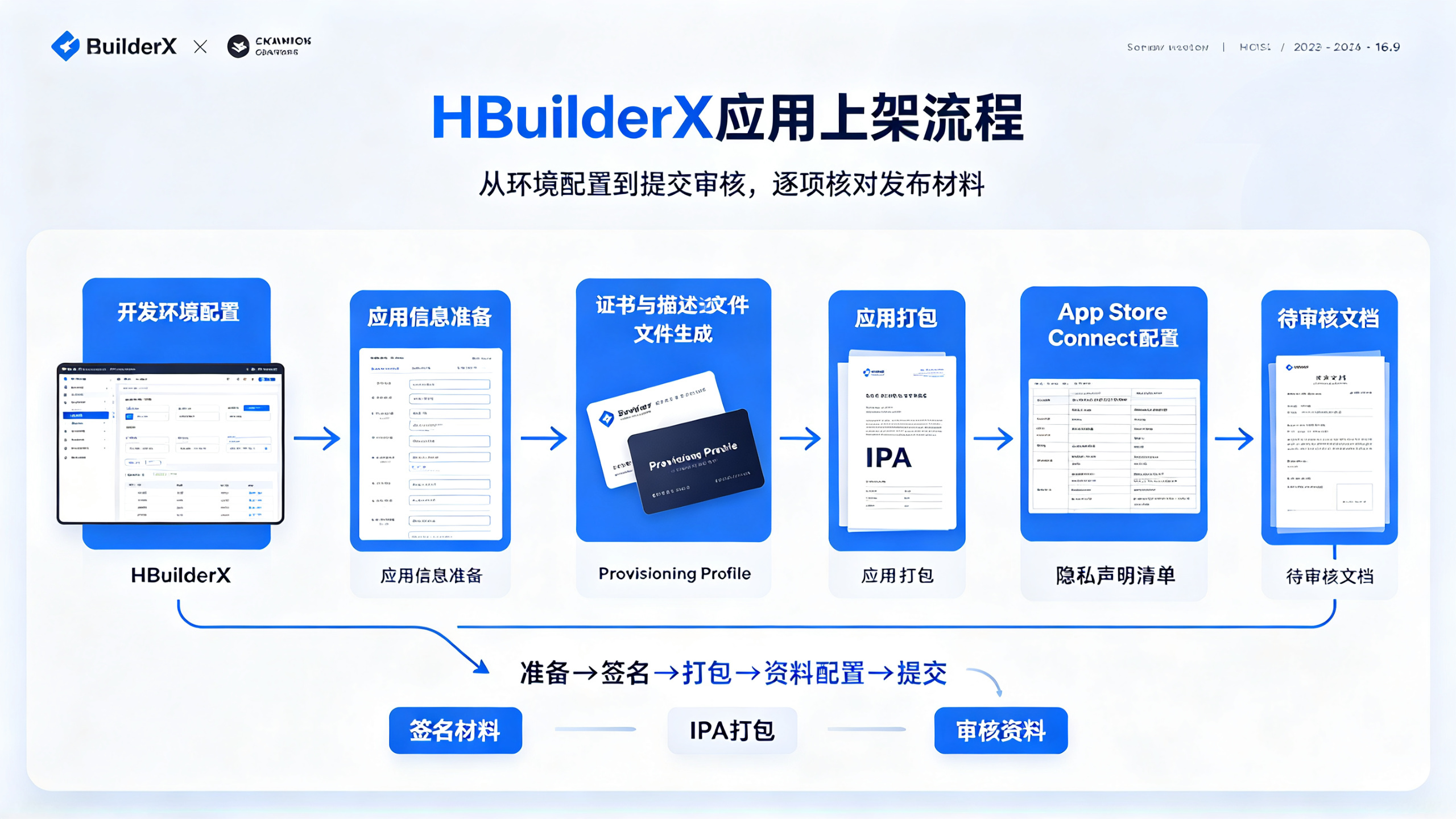
As one of the most headache-inducing steps for mobile developers, the App Store publishing process is like clearing stages in a game. Taking a hybrid app developed with HBuilderX as an example, it takes an average of 2–3 weeks from certificate preparation to final approval. I recently just finished publishing an e-commerce app, and the actual time from first submission to final approval was 22 days, during which it was rejected 3 times. Below I break down the key milestones of this "tribulation" journey for everyone.
Unlike Android's open ecosystem, Apple's closed system requires us to strictly follow its rules. The entire process can be divided into six stages: development environment configuration → app information preparation → certificate and provisioning profile generation → app packaging → App Store Connect configuration → submission for review. Each step has hidden "minefields"; for example, our team once stumbled on the In-App Purchase review terms.
2. Hard Requirements for the Development Environment
2.1 Required Developer Account
Not having a developer account is like wanting to go abroad without a passport—there is no way. The choice between an individual account ($99/year) and an enterprise account ($299/year) depends on the app distribution format. If it is an internal enterprise app, you also need to apply separately for the Enterprise Program. It is recommended to complete registration early in the project startup, because account review may take 1–3 business days.
Important note: Since 2023, Apple has required all newly registered accounts to enable two-factor authentication, and the developer name must exactly match the ID card or passport. We were once stuck for a week because of a pinyin spacing issue.
2.2 Detailed Explanation of the Certificate System
Apple's certificate system is a model of security systems, and it is also one of the most error-prone steps. It mainly involves three types of files:
Development Certificate
: used for real-device debugging, up to 3 can be generated
Distribution Certificate
: divided into App Store and Ad Hoc types
Push Notification Certificate
: if push services are needed, it must be configured separately
Certificate generation process:
钥匙串访问 → 证书助理 → 从证书颁发机构请求证书 → 保存CSR文件 → 开发者后台上传
2.3 Provisioning Profile
This XML file binds the certificate, device ID, and app ID together. Special notes:
The development provisioning profile is valid for 3 months.
The distribution provisioning profile is valid for 1 year.
Every time a new device is added, it needs to be regenerated.
When we ran multiple projects in parallel, we once had a packaging failure due to confusion between description files. It is recommended to adopt the naming convention of "project name + environment + date", such as "ShopApp_Prod_20230815".
3. HBuilderX-specific configuration
3.1 Key configurations in manifest.json
This configuration file is equivalent to the app's ID card, and the following fields require special attention:
{
  "id": "com.yourcompany.appname",  // 必须与开发者后台完全一致
  "version": {
    "name": "1.0.0",  // 每次提交审核必须递增
    "code": "100"     // 整数递增,不可回退
  },
  "ios": {
    "UIRequiresFullScreen": true,  // 强制全屏
    "capabilities": {
      "entitlements": {
        "com.apple.developer.in-app-payments": ["merchant.com.yourcompany.appname"]
      }
    }
  }
}
3.2 Native plugin compatibility handling
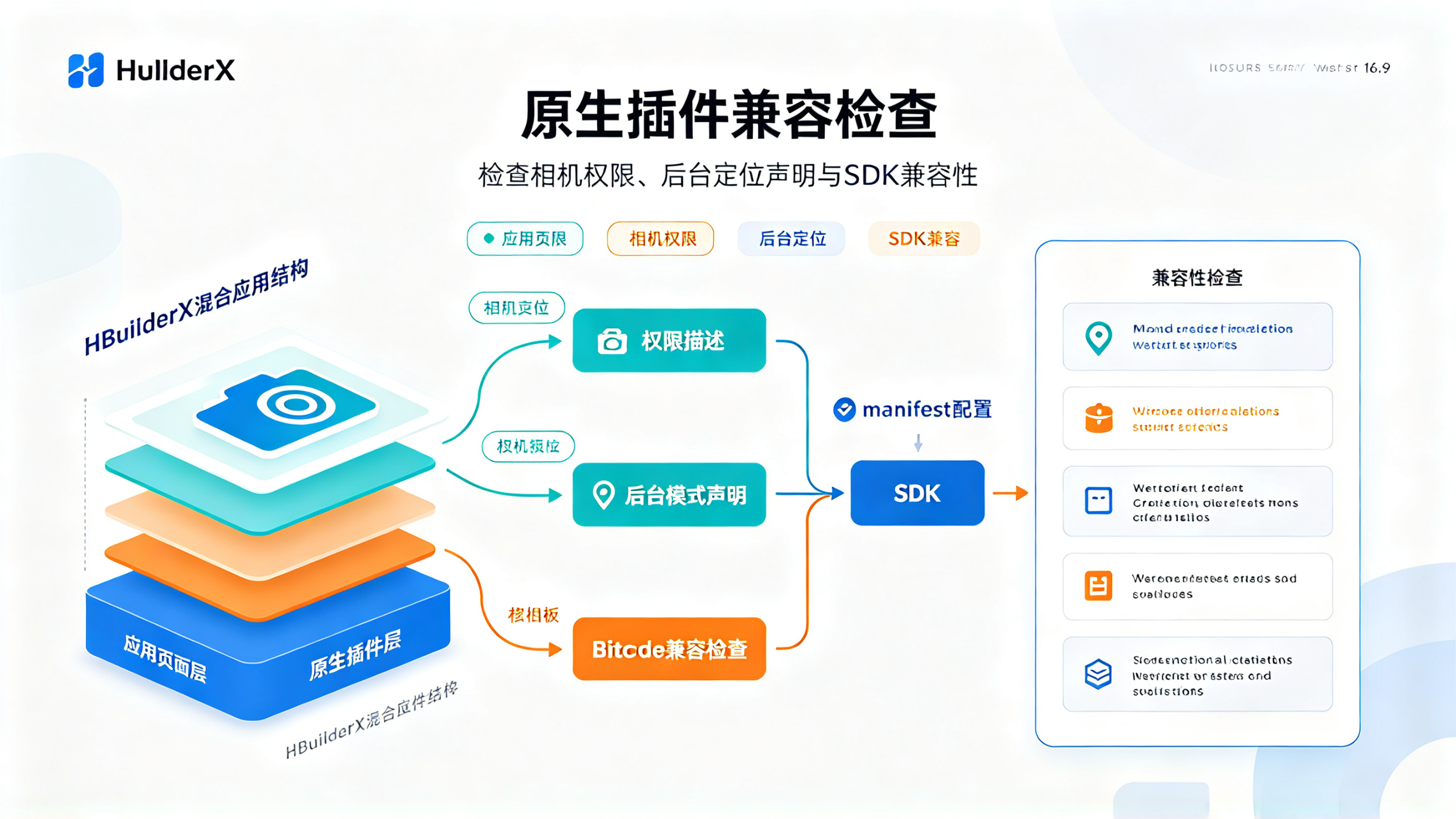
HBuilderX's hybrid architecture may cause some native functions to malfunction. Common issues include:
Missing permission description for the camera plugin.
Background mode for location services not declared.
Bitcode compatibility issues with third-party SDKs
The solution is to explicitly declare permissions in the manifest:
<ios>
  <plist>
    <dict>
      <key>NSCameraUsageDescription</key>
      <string>需要相机权限来扫描二维码</string>
      <key>NSLocationAlwaysUsageDescription</key>
      <string>需要持续定位来提供周边服务</string>
    </dict>
  </plist>
</ios>
4. App packaging and uploading
4.1 Cloud packaging and local packaging
HBuilderX provides two packaging methods:
Method | Time required | Applicable scenarios | Disadvantages |
Cloud packaging | 3–5 minutes | Quick testing | Cannot customize certificates |
Local packaging | 10–15 minutes | Official release | Requires configuring the Xcode environment |
It is recommended to use cloud packaging during the development phase and switch to local packaging for release. The original text mentioned that a submission was once rejected due to a cloud packaging certificate caching issue, and the solution is:
Delete the following in the project
unpackage
directory
Clear the HBuilderX cache (menu → Run → Clear project cache)
Regenerate manifest.json
4.2 IPA upload tips
When uploading with Application Loader or Transporter, common errors and solutions are as follows:
ERROR ITMS-90704
: Missing privacy policy link
Add a compliance link in App Store Connect → App Information
ERROR ITMS-90096
: Screenshot sizes do not match
You must use 6.5-inch (iPhone 13 Pro Max) and 5.5-inch screenshots
ERROR ITMS-90809
: Deprecated API warning
Repackage using the latest version of HBuilderX
Testing found that upload speeds are fastest and the failure rate is lowest between 9 and 11 AM (California time).
5. Detailed App Store Connect Configuration
5.1 Metadata Preparation Checklist
This is the most easily underestimated step. The materials you need to prepare include:
App name
: Within 30 characters; watch out for trademark risks
Subtitle
: 30 characters, displayed below the name
Keywords
: 100 characters, separated by commas
Description
: The first 2 lines are the most critical; it is recommended to include the core features
Promotional text
: 170 characters, can be modified at any time without review
Support URL
: Must be real and valid
Our optimization tips are:
Add common misspellings to the keywords
Add emoji symbols before the description to increase the tap-through rate
Update promotional text every quarter to keep it fresh.
5.2 Review Questionnaire Pitfall Avoidance Guide
The review questionnaires newly added in 2023 can be called "death questionnaires," mainly involving:
Data Collection Statement
Is device information collected?
Are encryption algorithms used?
Content Copyright
Is there user-generated content?
How are infringement complaints handled?
Business Model
Types of In-App Purchase Items
Renewal Instructions for Subscription Services
It is recommended to prepare standard answer templates in advance, especially for the parts involving data privacy. There was once a case where proof of German GDPR compliance was required, and the review was only passed after a dedicated section was later added to the privacy policy.
6. Review Acceleration Tips
6.1 Expedited Review Application
You can apply for expedited review if you meet the following conditions (2–3 opportunities per year):
Major bug fixes (crash logs required)
Time-sensitive events (such as coordinating with offline events)
Legal compliance requirements
Application path: App Store Connect → App → Events → Expedited Review Request
6.2 Top 5 Common Reasons for Rejection
According to 2023 statistics, the most common rejection clauses are as follows:
Guideline 5.1.1
: Non-compliant data collection (31%)
Guideline 3.1.1
: In-app purchase issues (22%)
Guideline 4.3
: Repeated application (15%)
Guideline 2.1
: Incomplete application (12%)
Guideline 5.2
: Copyright issues (8%)
Regarding clause 5.1.1, our current approach is:
Make Apple native sign-in a required option
Clearly display a data flow diagram in the privacy policy
Provide a user data export feature
7. Post-launch operations key points
7.1 Version update strategy
A phased rollout is recommended:
Day one: Release to 10% of users
Day three: If there are no anomalies, increase to 50%
Day five: Full release
When the crash rate>is 1%, the release should be paused immediately. Through this strategy, we reduced the crash rollback rate from 23% to below 5%.
7.2 User review management
Reply to at least 3—5 negative reviews each week. You can refer to the following template:
"Thank you for your feedback! Regarding [specific issue], we have optimized it in [version number], and the fix in the new version is [solution]. We look forward to your continued support!"
Combined with appropriate version iteration notes, this can raise the app rating by 0.5—1 stars.
Launching is only the beginning; the subsequent ASO optimization, review management, and version iteration are the long-term battle. A recent project increased organic downloads 3 times through continuous optimization. Remember, the App Store is not a one-time exam but a battlefield of long-term operations.