Why Can't a Shell App Be Published by Simply Wrapping a Shell?
The article explains why publishing an Apple shell app cannot be done by just changing icons and UI, pointing out that underlying similarities in code structure, functional positioning, and resource files are the real focus of review, and clarifies that passing the first few apps does not mean reskinning will always work, helping readers understand specific directions for project differentiation.
Why Can't a Shell App Be Published by Simply Wrapping a Shell?
Many people doing Apple shell apps for the first time have a misconception:
If I change the original App's name, change the icon, modify a few images, and repackage and submit it, can it be published?
In fact, this method is becoming increasingly difficult now.
Apple's review does not only look at the App's icon, name, and page colors, but comprehensively judges code, functionality, UI, resource files, product positioning, and submission status.
Therefore, publishing a shell app is not simply "wrapping a shell".
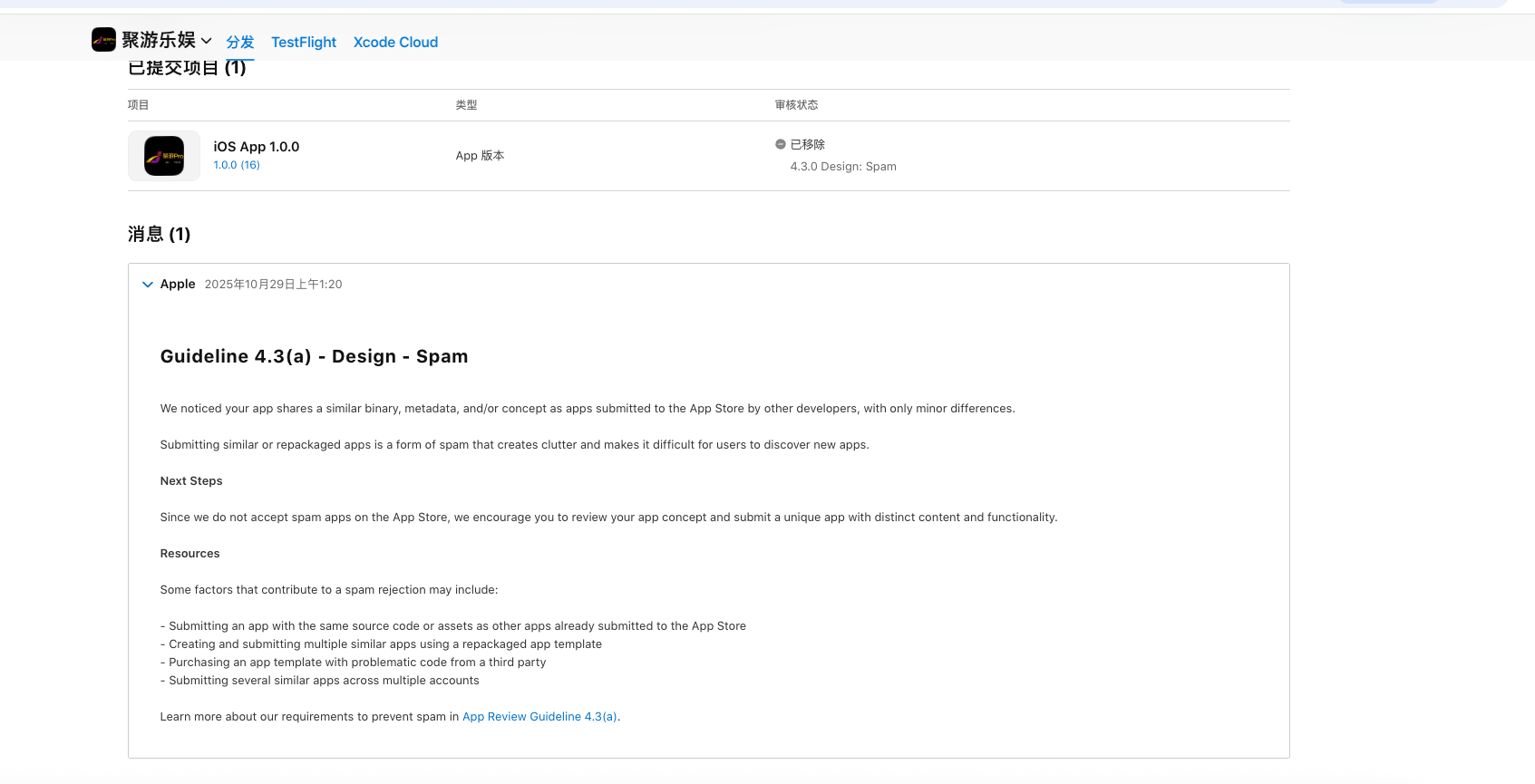
1. Only changing the UI, the underlying app is still the same, because its binary file remains the same, and the root problem cannot be solved
Many shell apps do very simple things:
- Change the App name
- Change the Logo
- Change the launch screen
- Modify the theme color
- Replace a few page images
But the underlying code, functional flow, page logic, and resource structure have hardly changed.
In this case, from the user's perspective, it may already look like two different Apps, but from the project structure perspective, they are still highly similar.
Especially when the same set of code is used to continuously package multiple apps, only modifying surface resources, the overall difference is actually very limited.
2. Code similarity is the issue that is more easily overlooked
Many people only focus on pages when making shell apps, but ignore duplication at the code level.
For example:
- Class names and method names are highly consistent
- File directory structure is completely identical
- Public components are heavily reused
- Third-party SDK combinations are consistent
- Network request structures are consistent
- Page navigation logic is consistent
- Local configuration files are consistent
- Unused code and legacy code have not been cleaned up
These contents will not automatically disappear just because the UI has been changed.
Therefore, what a shell app really needs to handle is not just "looking different", but the entire project itself needs to form a certain degree of independence.
3. Functional positioning cannot be completely the same either
There is another common situation:
The pages of two Apps have been redesigned, but the functions, copy, usage flow, and data content are almost completely identical.
In this case, even if the UI differences are relatively large, there may still be a problem of excessive similarity.
A more reasonable approach is to re-plan the App's usage scenarios.
For example, for English learning Apps, they can respectively focus on:
- Children's vocabulary learning
- Exam vocabulary memorization
- Listening training
- Phonetic symbol learning
- Daily study plans
- Scenario-based speaking training
Functions can be partially reused, but the core entry points, key modules, and user usage paths should preferably be differentiated.
4. Resource files are also a key point
Many projects appear to have been changed a lot on the surface, but after opening the final installation package, you will find:
- Image names are still the same
- JSON configurations are the same
- Local resource directories are the same
- Audio files are the same
- Font files are the same
- Historically abandoned resources are still there
- File organization structure has not changed
This is also a place that many people easily overlook.
When truly doing differentiation, you should not only look at page screenshots, but also check how many old project features are still retained in the final installation package.
5. The overall structure of the App is more important than changing any single item
A shell app is not just about changing one place particularly much.
For example:
The UI has been changed, but the code is completely the same.
Or some code has been changed, but the product functions and page flow are completely identical.
These modification methods are relatively one-sided.
A more reasonable approach is to adjust from multiple levels together:
- Product positioning
- Page structure
- Operation flow
- Function combination
- Code structure
- Resource files
- Copy content
- Metadata
The more natural the overall difference, the stronger the project's independence.
6. Why can some Apps pass the first few times, but become increasingly difficult later?
This situation is very common.
At first, maybe just changing the UI and name can also pass normally.
So people think this method can be copied forever.
But as more and more projects of the same type appear, the same code structures, functional logic, and resource characteristics will also repeat continuously.
Later, it becomes more likely to encounter:
- 4.3
- 4.3(a)
- 4.3(b)
- 2.1
- Longer review times
- Requests for further explanation of the App's unique value
Therefore, just because the first few projects passed, you cannot assume that simple reskinning will always be effective.
7. What truly needs to be done is "project differentiation"
If you want to make a shell app, the more important thing is to rebuild a complete and independent App.
You can focus on handling it from the following directions:
1. Redefine product positioning
Clarify what users the new App targets and what problems it solves.
2. Redesign the page structure
Not only change colors, but also adjust layout, navigation, module structure, and interaction methods.
3. Adjust the function combination
Do not completely copy the original project's function order and usage flow.
4. Check the code structure
Reduce unnecessary duplicate code and handle the same characteristics left by long-term reuse.
5. Clean up resource files
Delete abandoned images, configurations, audio, and useless files.
6. Check the final installation package
Do not only check the source code; the final packaged installation file also needs to be checked.
Summary
Nowadays, when making shell apps, the most problematic way of thinking is:
Copy the original project → change the Logo → change the name → change the color → resubmit.
This method is only surface reskinning and does not truly solve the problem of project duplication.
What a shell app truly needs to handle is:
Code differences, UI differences, functional differences, resource differences, product positioning, and overall structural differences. It is best to find some similarity detection tools to detect similarity from multiple dimensions;
Therefore, publishing a shell app is not simply wrapping a shell, but making the new App have relatively independent characteristics from the product to the engineering level.