
Pros and Cons of Wrapping a Web Page into an App: Fast Development, but Not Suitable for Every Project
Wrapping a web page into an app enables fast development, low cost, and easy updates, but it has clear shortcomings in user experience, network dependency, native capabilities, and app store review. The article outlines which project types are suitable and unsuitable, and points out that long-term operations require a hybrid architecture combining web business logic with native capabilities, rather than a simple shell.
Pros and Cons of Wrapping a Web Page into an App: Fast Development, but Not Suitable for Every Project
When building an app, many companies consider a relatively cost-saving approach: directly wrapping an existing web page, H5, or web system into an app.
Simply put, the app itself mainly serves as a "shell" that loads web content when opened. Common implementation methods include WebView, Hybrid App, and H5 embedded in uni-app, among others.
This approach is indeed fast to develop, but its pros and cons are also very obvious. What we need to do is a technical assessment.
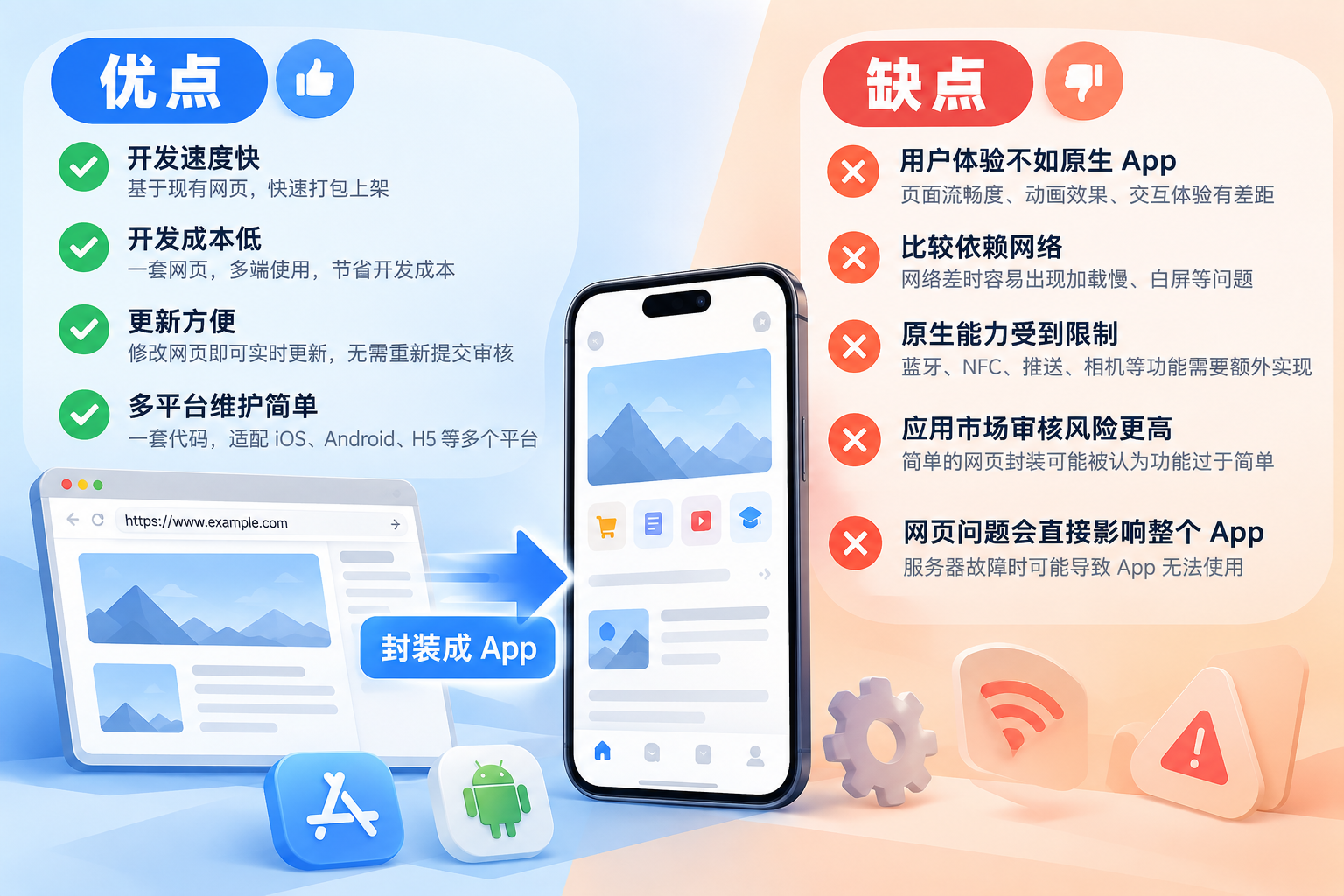
I. Advantages of Wrapping a Web Page into an App
1. Fast Development
The biggest advantage is speed.
If you already have a mature mobile web page, wrapping it into an app does not require redeveloping all the business logic. You only need to add the app shell, splash screen, icon, permissions, and some native features.
A well-developed H5 project usually saves a significant amount of time compared with developing native iOS and Android apps from scratch.
2. Low Development Cost
Normally, building a full app may require maintaining:
- iOS
- Android
- H5
- Backend APIs
With a web wrapping solution, most business code can be shared.
Especially for projects such as e-commerce, information display, enterprise internal systems, and membership centers, using web wrapping can significantly reduce upfront development costs.
3. Convenient Updates
After modifying features in a native app, it generally needs to be repackaged, submitted for review, and wait for app store approval.
But if the core content is on the web side, you only need to modify the web code on the server, and users can see the latest content when they reopen the app.
This is very convenient for campaign pages, news content, and operational pages.
4. Simple Multi-Platform Maintenance
The web page itself can run simultaneously in browsers, Android, iOS, and other environments.
Compared with maintaining a separate codebase for each platform, web wrapping is more suitable for projects with smaller development teams and relatively frequent feature updates.
II. Disadvantages of Wrapping a Web Page into an App
1. User Experience Is Usually Inferior to Native Apps
There is still a gap in experience between web pages and native apps.
For example:
- Page transition smoothness
- Scrolling experience
- Animation effects
- Gesture operations
- Keyboard adaptation
- Page loading speed
If the web page itself is not well optimized, after wrapping it is easy for users to feel that "this is just a website wrapped in an app shell."
2. Relatively Dependent on the Network
Most web-wrapped apps need to load pages from a server.
Once the user's network is poor, problems may occur such as:
- White screen
- Slow loading
- Page fails to open
- Images fail to display
Therefore, wrapped apps must have good loading animations, network error pages, caching, and offline prompts.
3. Native Capabilities Are Limited
Ordinary web pages cannot directly and fully access the phone's underlying capabilities.
For example:
- Bluetooth
- NFC
- Background location
- Push notifications
- Camera
- File system
- Contacts
- Biometric recognition
Although these can be implemented through JSBridge, plugins, or native modules, as native features increase, project complexity also grows.
In the end, the advantage of "simple web wrapping development" may be lost.
4. Higher App Store Review Risk
This point is very important.
Especially on the App Store, if an app simply loads a web page without obvious app functionality and independent value, it may be considered too simple in functionality or too obviously a website wrapper during review.
So it cannot be simply understood as:
"Put the website into a WebView and it can be published directly."
If you plan to submit to an app store, you usually need to add a certain amount of native app experience, such as:
- Native navigation
- Login system
- Message notifications
- File upload
- Camera invocation
- Sharing features
- Local caching
- Native settings page
At the same time, the app's functional positioning, UI, and interaction must also be complete.
5. Web Page Problems Directly Affect the Entire App
With a native app, even if some server-side features have problems, some local pages may still work normally.
But with a web-wrapped app, if the server fails, the entire app may become unusable.
Therefore, server stability, CDN, HTTPS, domain names, and API stability are all very important.
III. Which Projects Are Suitable for Web-Wrapped Apps?
Relatively suitable:
- Enterprise internal management systems
- Information display apps
- E-commerce projects
- Membership systems
- Educational course display
- Tool backends
- Content and news platforms
- Projects that already have a mature H5 and want to quickly add an app version
Not very suitable:
- Large-scale games
- Video editing
- Heavy map applications
- Extensive Bluetooth/NFC functionality
- High-frequency background location
- High-performance audio and video processing
- Apps with very high requirements for animation and interaction
IV. Web Wrapping Is Not Equal to a Simple Shell
For an app truly intended for long-term operation, even if web pages are used as the main technical solution, it should adopt:
Web business + native capabilities + local caching + exception handling + independent app interaction
This kind of hybrid architecture.
This can retain the advantages of fast web development and convenient updates while improving user experience and app store review issues.
Therefore, web-wrapped apps themselves are not problematic. The key lies in whether the project is suitable and whether, after wrapping, it is truly made into a complete app.
Some small apps use web wrapping; large projects and third-party login require native development;